Connect your phone or tablet with a cable
Here's how to connect your mobile phone or tablet using a cable. This drastically reduces radiation, meaning you can turn off your Wi-Fi at home. You will need a fixed broadband connection.
Any Apple mobile product with a Lightning connector and iOS 9 or later can be connected using a cable. This may not be possible with mobile phones or tablets from other manufacturers. Although all non-iPhone mobile phones have the same operating system, Android, each manufacturer can add and remove features. The ability to connect a phone with a cable is often removed.

The mobile phone is connected to the adapter, which is connected to a network cable that is plugged into the router handling the fixed broadband connection.
Adapter solves connection problems
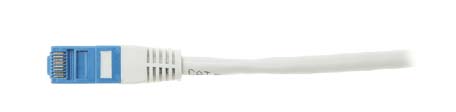
This 'patch cord' is an Ethernet cable with square RJ45 connectors at each end.
The mobile phone's charging connector is also used to transfer data in the form of electrical signals. However, these signals differ from those in the network cable, which is why an adapter is needed. This has a USB connector at one end and an Ethernet connector at the other, with electronics in between. The Ethernet connector is an RJ45 connector. A network cable is also called an Ethernet cable and has RJ45 connectors at both ends.
The charging connector on your mobile phone is either micro-USB or USB-C.

Micro-USB connector on the left and USB-C connector on the right.
Do all adapters work?
There are lots of USB-to-Ethernet adapters available to buy online. Those with the standard USB Type A connector are designed for laptops, but can also be used with mobile phones when connected to a USB hub or OTG cable. The transition from micro USB to USB-C has, in most cases, solved the problem of adapters not working with all mobile phones. If your mobile phone or tablet has a USB-C connector and the cable connection does not work, it is probably because it does not have that function.

A cable connection has been possible for a long time. The phone in the picture is a Sony Xperia Z1 Compact model D5503 with an Android 5.1.1 operating system and an RS1081B NO:9700 adapter. It works, but the adapter is no longer available for purchase. The phone is from 2014.
Settings
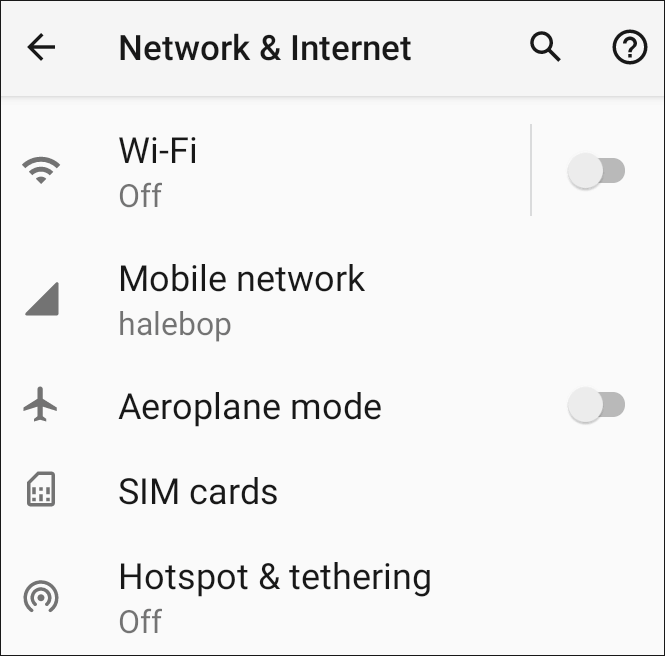
Calls and text messages form part of the original mobile phone service and can be enabled or disabled using Aeroplane mode. Anything else you can do with a mobile phone, such as surfing the internet, making payments or using an identification service, uses data which can be sent over the mobile network or Wi-Fi. If you turn off mobile data, data will be sent via Wi-Fi if it is available. If you also turn off Wi-Fi, a cable connection will be used if it is available. Bluetooth is used for wireless contact with nearby gadgets which can be a hot spot for internet connection.
The easiest way to access the settings is to swipe downwards from the top of the screen to display a menu with settings for wireless communication. If you can't see all the settings swipe again or select 'Shortcuts' if there is such an option.
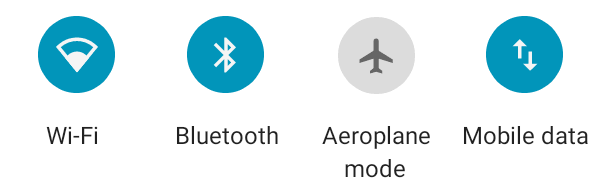
Usually, all wireless communications, such as Wi-Fi, Bluetooth and mobile data, are enabled. Calls and text messages work because Aeroplane mode is off. This is indicated by the grey Aeroplane mode symbol, which may also have a line through it.
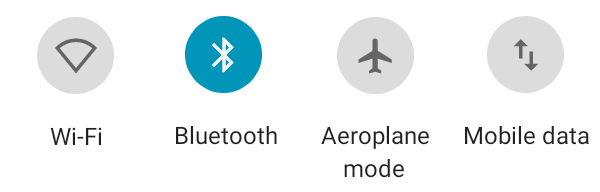
Calls and text messages work because Airplane Mode is not activated, while mobile data and Wi-Fi are turned off, meaning there is no internet connection. However, Bluetooth can be paired with a hotspot that provides an internet connection. Otherwise, Ethernet is the only way to connect.

Aeroplane mode is disabled, so you can make and receive calls and text messages. All other wireless communication has been disabled. The phone must use the Ethernet connection to reach the internet.
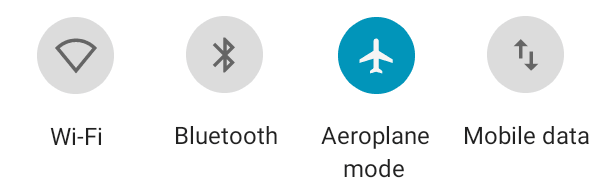
Aeroplane mode is switched on and all other wireless connections is off. This turns off all wireless communication, including calls and text messages. The only way to connect to the internet is via the Ethernet connection. The radiofrequency radiation is minimised.

You can switch Wi-Fi and Bluetooth on or off independently of Aeroplane mode. Mobile data depends on Airplane mode and cannot be switched on when Aeroplane mode is active, as this cuts off the connection to the mobile network that Mobile data uses to connect to the internet. However, Wi-Fi can provide an internet connection via a router connected to the internet, like Bluetooth paired with a hotspot.
 Another way to turn
wireless functions on and off is via the Settings menu. Tap
the cogwheel icon. In the menu that opens, 'Aeroplane mode'
and 'Mobile data' may be missing, but they can be found under
'More'. Mobile data can then be found under 'Mobile networks',
'Network & Internet' or a similar option.
Another way to turn
wireless functions on and off is via the Settings menu. Tap
the cogwheel icon. In the menu that opens, 'Aeroplane mode'
and 'Mobile data' may be missing, but they can be found under
'More'. Mobile data can then be found under 'Mobile networks',
'Network & Internet' or a similar option.
Adapters and accessories
A modern mobile phone is essentially a portable computer, so it may be possible to connect a mouse and keyboard via a USB port, among other things. However, this depends on what the manufacturer deems necessary.
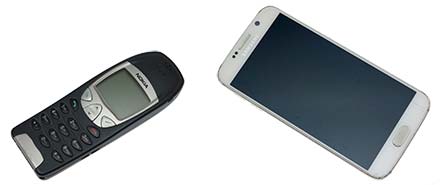
On the left is the Nokia 6210 from 2000. It had calls, text messages and an address book for 500 names. Right: The Samsung Galaxy S6 (2015). The mobile phone has evolved into a computer and camera that can also be used for making calls. Although it cannot connect to the internet via cable, it can connect to a USB memory stick, mouse and keyboard. However, even though you can select a Swedish keyboard layout, the letters Å, Ä and Ö are not available.
OTG-kabel
When you connect a mobile phone to a computer to transfer images or music, the computer controls the communication. The computer acts as the host, while the mobile phone acts as a slave alongside other accessories, such as mice, keyboards and USB sticks. However, when accessories are connected to the mobile phone, the phone must become the host and take control. This is achieved using an OTG cable. OTG stands for 'On The Go'. Ethernet adapters that connect to the mobile phone without an OTG cable have the OTG function built in.
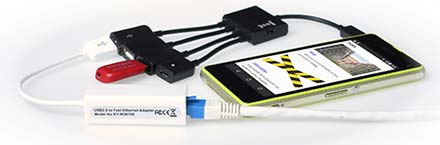
It's the same old Sony Xperia as in the previous picture, but this time it's connected to a different Ethernet adapter with a USB-A connector. An OTG cable is required to connect the mobile phone to the adapter. The adapter in the picture has three USB-A ports and one port for a charging cable. The Xperia Z1 Compact can connect to the internet via a cable using the KY-RD9700 adapter and a USB memory stick, as well as a mouse and keyboard with Å, Ä and Ö.
Experiences and tables
We tested using the equipment available to us. Mice, keyboards and USB sticks are standardised so that they can be used with different computers. However, Ethernet adapters are not standardised, so it may work with a different adapter to the ones we tested. If nothing worked, it means that the mobile phone is completely unable to connect to accessories. In the case of the Samsung Galaxy S6, the Ethernet adapter's indicator light came on, meaning it was receiving power, but the phone lacked the necessary software. The same thing happened with the Motorola Moto E20. It has a slimmed-down version of Android called Android (Go edition), which is intended for inexpensive phones. In Android (Go edition), features have been removed, and the remaining ones have been made less resource-intensive. In the table below the Swedish letters Å, Ä and Ö indicate adaptation to local languages.
| Huawei
Y6/MYA-L41 |
|
| Ethernet adapter: | No |
| Keyboard: | No |
| Mouse: | No |
| USB memory stick: | No |
| Motorola
moto e20 |
|
| Ethernet adapter: | No |
| Keyboard: | No |
| Mouse: | No |
| USB memory stick: | Yes |
| Samsung Galaxy
A13 |
|
| Ethernet adapter: | Yes |
| Keyboard: | ? |
| Mouse: | ? |
| USB memory stick: | ? |
| Samsung Galaxy
Note9 |
|
| Ethernet adapter: | Yes, UNI B0871ZL9TG |
| Keyboard: | Yes with ÅÄÖ |
| Mouse: | Yes |
| USB memory stick: | Yes |
| Samsung
Galaxy S6 |
|
| Ethernet adapter: | No |
| Keyboard: | Yes, without ÅÄÖ |
| Mouse: | Yes |
| USB memory stick: | Yes |
| Samsung Galaxy | Tab 4 7" WiFi |
| Ethernet adapter: | No |
| Keyboard: | No |
| Mouse: | No |
| USB memory stick: | No |
| Sony
Xperia XQ-AU52 Compact |
|
| Ethernet adapter: | Yes, uni USB-C to gigabit ethernet. |
| Keyboard: | Yes, without ÅÄÖ |
| Mouse: | Yes |
| USB memory stick: | No, but a slot for SD cards. |
| Sony
Xperia Z1 Compact |
|
| Ethernet adapter: | Yes, KY-RD9700 and OTG cable |
| Keyboard: | Yes, with ÅÄÖ |
| Mouse: | Yes |
| USB memory stick: | Yes |
| Xiaomi
11T |
|
| Ethernet adapter: | Yes, UNI B0871ZL9TG |
| Keyboard: | Yes, without ÅÄÖ |
| Mouse: | Yes |
| USB memory stick: | Yes |
| Xiaomi
Poco X6 Pro 5G |
|
| Ethernet adapter: | Yes, UNI B0871ZL9TG |
| Keyboard: | Yes, with ÅÄÖ |
| Mouse: | Yes |
| USB memory stick: | Yes |